Every org, any tenant
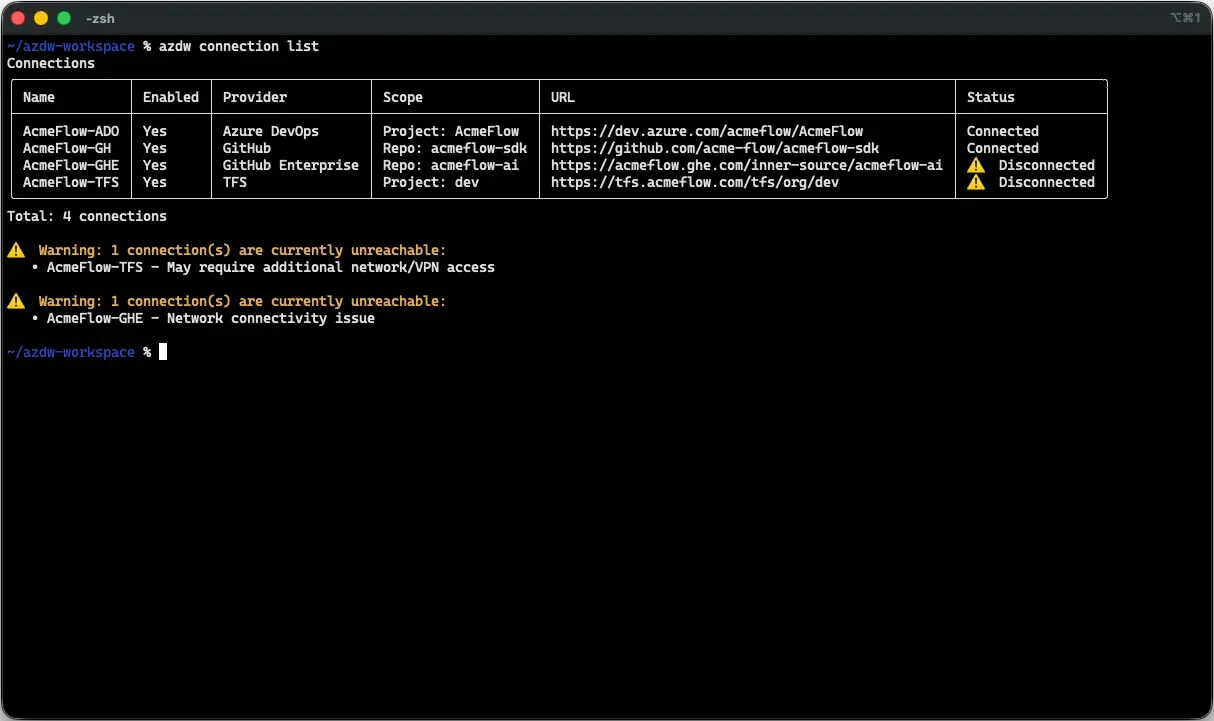
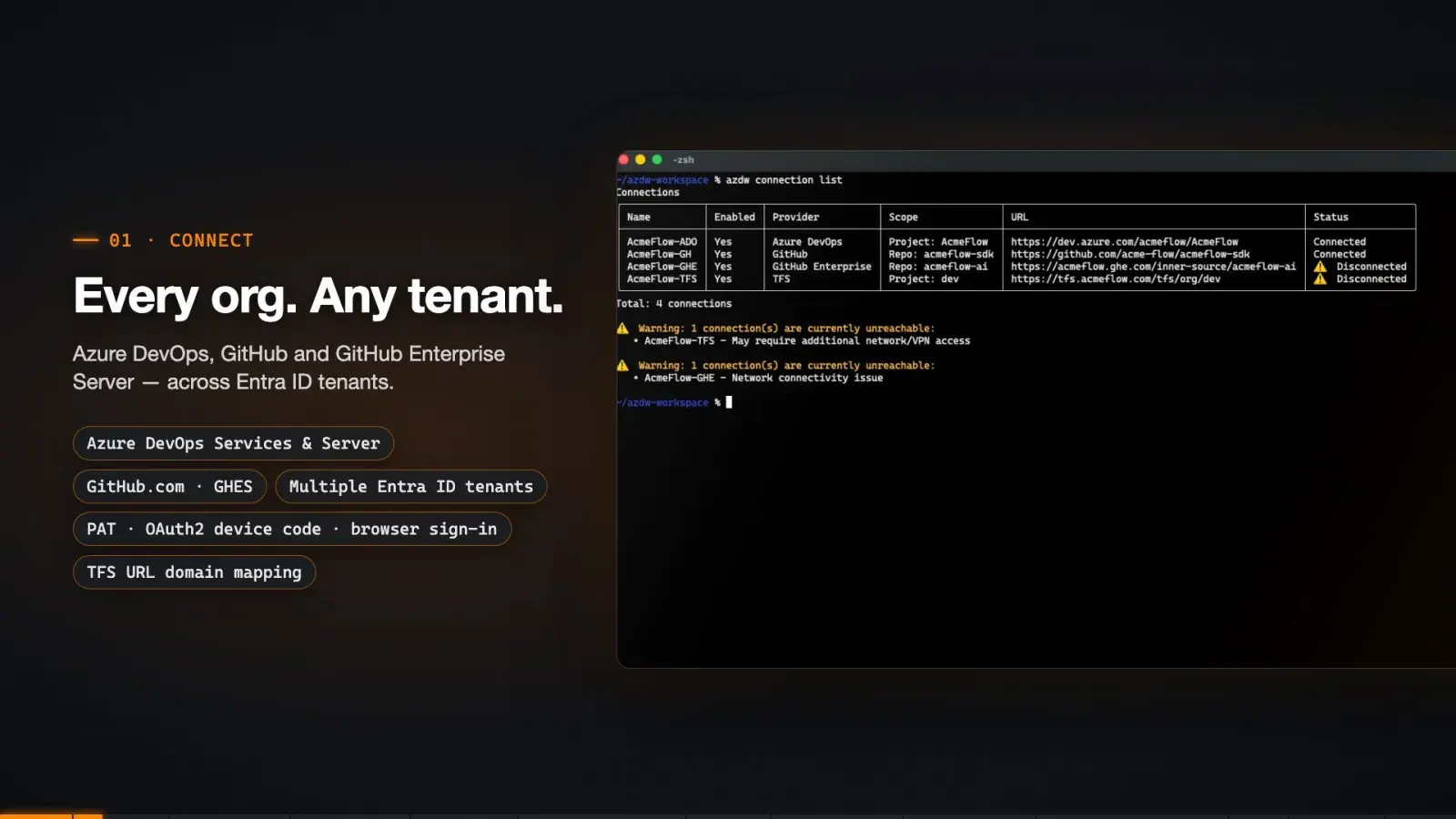
Azure DevOps Services and Server, GitHub.com and GitHub Enterprise Server — across Entra ID tenants. PAT, OAuth2 device code, or browser sign-in.
azdw connection add --name Demo --url https://dev.azure.com/…
Prepare portfolio and release reviews from connected work items and dependencies across Azure DevOps and GitHub. Reuse the collection and reporting workflow next time, without replacing the systems your teams rely on.
Keep your systemsRepeatable workflowsAI optional
Real product output. Nothing here is a mock-up.
Teams plan and track work in Azure DevOps and GitHub, often across projects, organizations, and tenants. Engineering and portfolio leaders still need to prioritize shared initiatives and assess releases across that landscape.
A shared decision needs more than separate status reports. The challenge is connecting the work behind those reports, not moving every team into a new tool.
Collect status. Merge exports. Follow links across systems. Before the discussion can start, someone has to reconstruct how the work fits together. That preparation repeats, and dependencies can disappear between isolated team views.
Separate systems often exist for good reasons: acquisitions, organizational scale, compliance boundaries, or history. A decision-ready view should work with that reality.
Acquired teams bring their own orgs and tenants.
Azure DevOps org/project ceilings split growing estates.
Regulated units get their own tenant on purpose.
“It was set up that way in 2016.”
How do we get a current, traceable view of connected work for every review without rebuilding the data joins or replacing our systems?
Already have reporting in place? Keep it. azdw adds a reusable collection and relationship layer. Explore Microsoft's Power BI cross-organization example ↗

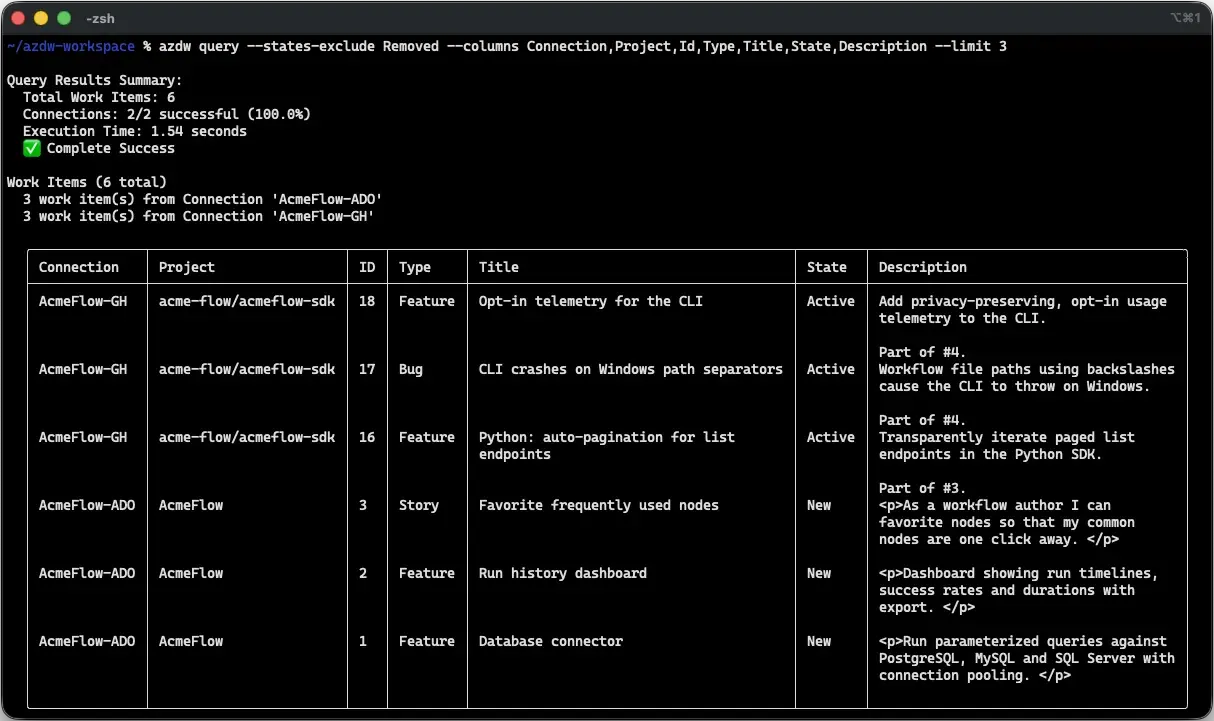
azdw query --columns Connection,Project,Id,Type,Title,State — two providers, one table.
azdw connects work items and their relationships into a reusable decision foundation across Azure DevOps and GitHub, without replacing your existing systems.
Your technical team configures authorized sources, queries, and relationship rules. You receive a reviewable result through reports, existing applications, or optional AI-assisted exploration. The original systems stay authoritative; results depend on source data, configured scope, permissions, and refresh or cache settings. azdw does not guarantee complete data, detect every risk, or make the decision for you.
A 60-second example: investigate release risks across Azure DevOps, TFS, and GitHub, follow dependencies in both directions, and approve targeted updates.
The preview is hosted on this site. The YouTube link opens an external site in a new tab; Google/YouTube may use cookies and track your activity there. This preview does not load a YouTube player or contact YouTube.
This fictional scenario is just one way to use azdw. Simpler everyday queries and more advanced automation and integrations will feature in future videos. Multi-connection access and writeback shown here require a paid tier; flagging a blocker does not resolve it.

Azure DevOps Services and Server, GitHub.com and GitHub Enterprise Server — across Entra ID tenants. PAT, OAuth2 device code, or browser sign-in.
azdw connection add --name Demo --url https://dev.azure.com/…

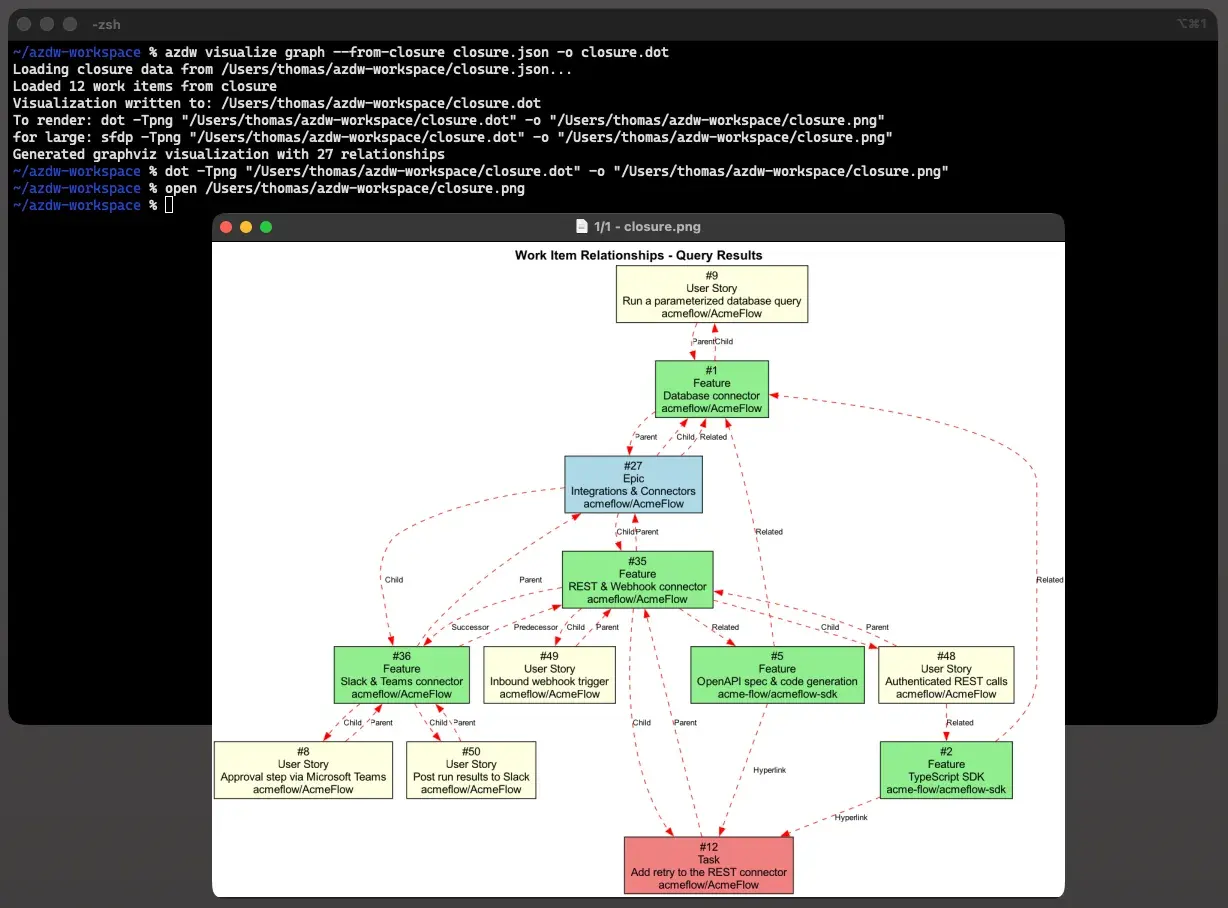
Hierarchy, dependencies, and hyperlinks — including links pointing back in from another org — resolved into a queryable closure.
azdw relationship find-closure --ids 9 --top-type Epic

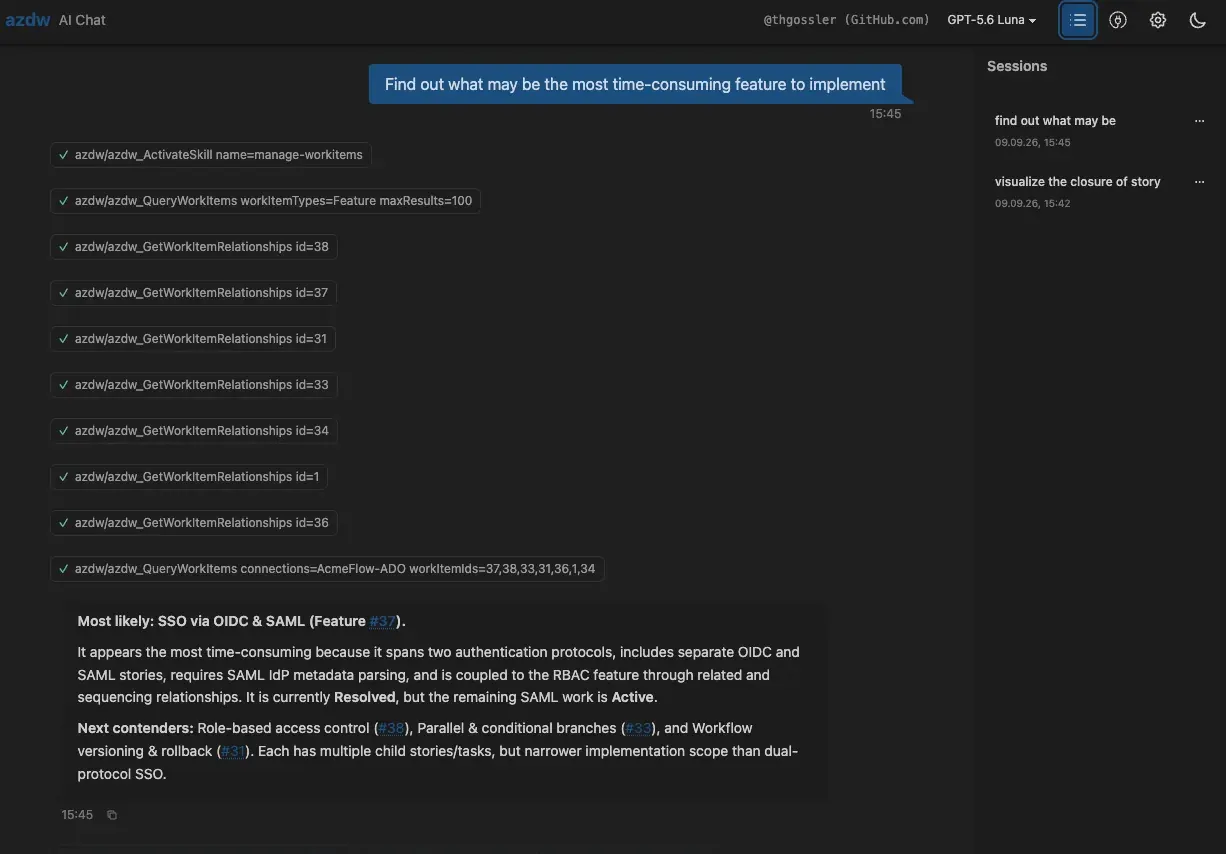
Use connected results in reports and existing applications, or explore them with optional AI chat. Save the collection and reporting workflow for your next review. AI-generated answers require human review.
azdw ai-chat --webui
Platform engineers, technical portfolio owners, and consultants operate and integrate azdw. Engineering and portfolio leaders receive the reports and evidence their review needs, without having to operate the CLI.
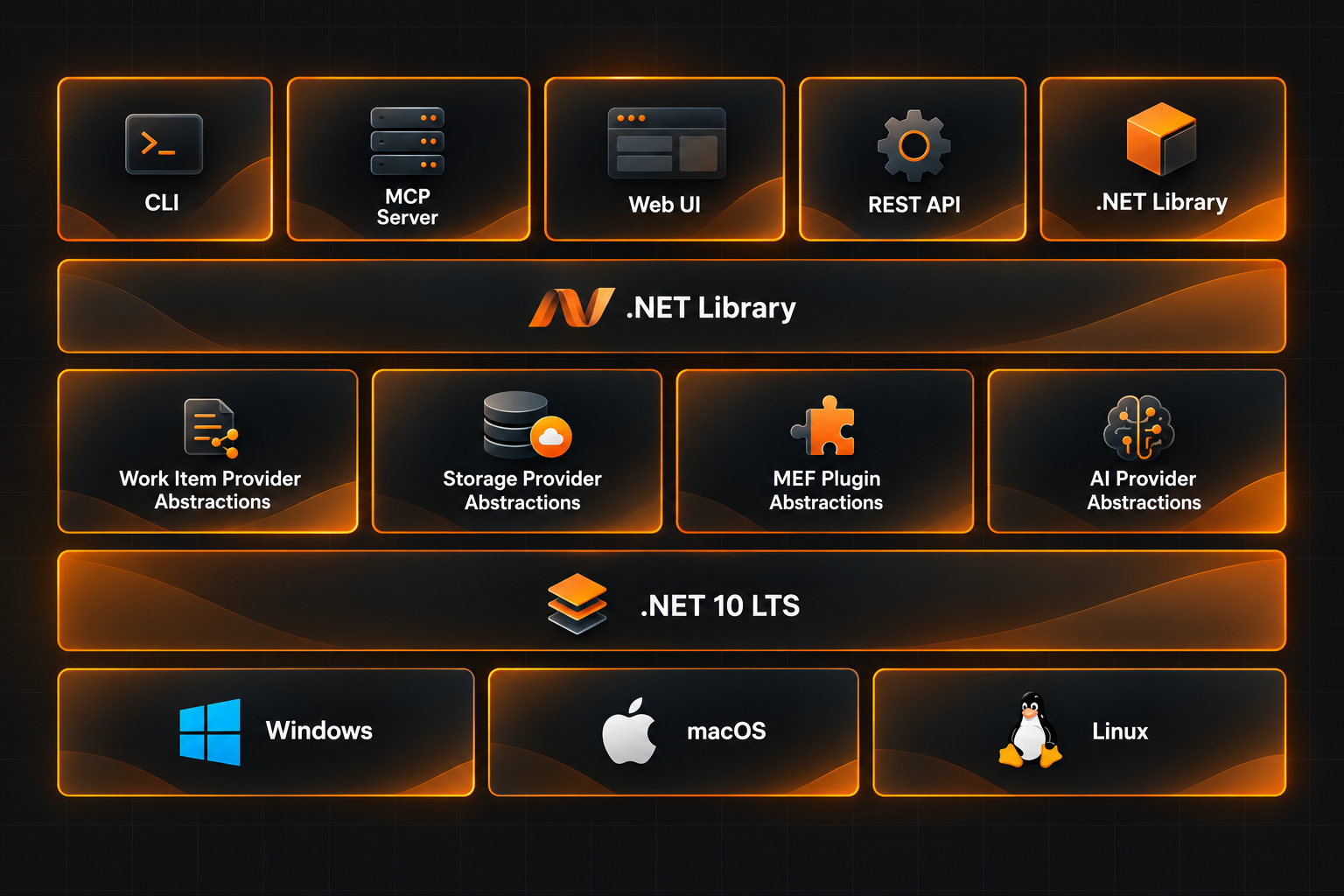
The CLI, MCP server, Web UI, REST API, and direct .NET integrations share the same library, with abstractions for work-item providers, storage, MEF plugins, and optional AI providers. Built on .NET 10 LTS for Windows, macOS, and Linux.
The opportunity is less repeated preparation and a more inspectable view of connected work. Start with one recurring portfolio or release review and compare the same scope before and with azdw.
Build the business case from observed results. Annual capacity value = verified person-hours saved per review × reviews per year × your loaded hourly cost. This is released capacity, not guaranteed cash savings. Subtract recurring costs and account for initial setup before estimating first-year net value.
These are evaluation criteria, not measured customer results. Benefits depend on your baseline, data quality, access, configuration, and adoption. Do not assign a financial value to hypothetical avoided release failures.
The deterministic data layer works without AI. If you opt in, you choose the provider and model and can change them later without changing your collection and query scripts.
No model anywhere. Query, resolve, report, visualize — interactively or headless, with guaranteed --json and exit codes. Drop it into a pipeline and run it on a schedule.
azdw query --connections A,B,C --json \ | jq '.[] | select(.State=="Active")'
Add value where it counts: plain language to WIQL with --ai, closure narratives with --ai-tell-story, AI-assessed reconciliation, terminal chat and the Web UI.
azdw query --ai "high-risk items not \ assigned to a release"
Keep model processing local: run the model on your own hardware with Ollama or another local OpenAI-compatible endpoint. Work-item content stays in your infrastructure when every model and agent endpoint in the workflow is local.
azdw config ai set --approach ollama \ --model gemma4:12b
Already paying for Copilot? Use it as azdw's AI provider — no extra API key, no new vendor. Anthropic, OpenAI and Azure endpoints work too.
azdw config ai set \ --approach github-copilot
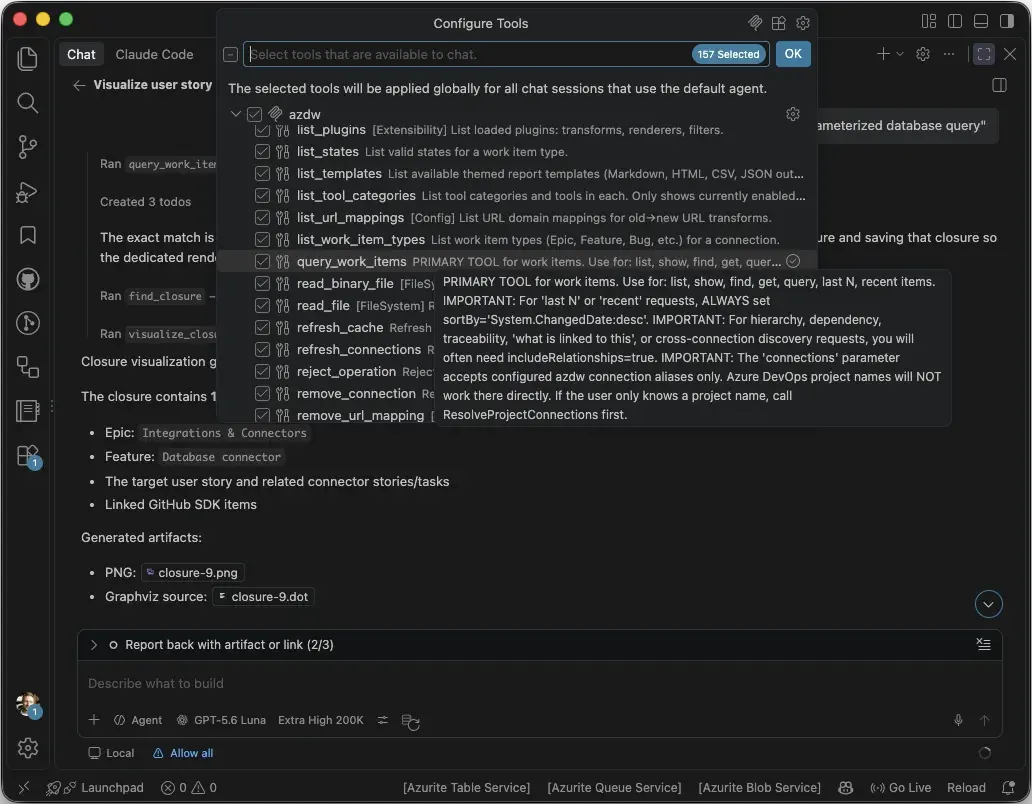
Let the agent do the tool calling. VS Code Copilot, Claude Code or Claude Desktop get a pre-shaped, deterministic view of your work items — with two-phase approvals on every write.
azdw mcp azdw config ai skills install
AI is optional. Its output comes from the provider and model you configure and varies with your data, prompts, permissions, settings, and instruction or skill files such as AGENTS.md. Review outputs and every proposed change before relying on or approving them; do not use AI output as the sole basis for decisions with legal or similarly significant effects on a person. See the AI terms and permitted-use conditions.
Let agents drive the work. Keep the plan visible to people.
The technology is changing, and changing how we work. If your Dark Software Factory plans put AI agents in charge of more software-delivery work, azdw could be a key ingredient: the connection between those agents and the work items your organization already uses.
Treat context like npm treats code: package it, version it, declare its dependencies, and publish it for reuse. Then keep it current. This is a lifecycle analogy, not a claim that azdw is a package registry.
Instructions and skills are only part of that context. Agents also need your organization's accumulated planning knowledge: what matters, what is in progress, what depends on what, and what changed.
The azdw Agentic AI Plugin packages access to that planning context. It brings connected work items and documented relationships across authorized Azure DevOps and GitHub sources into your agent's working context. Your existing systems remain the shared planning foundation, rather than becoming disconnected from the automation doing the work.
Automate more of the handling. Keep the plan current, traceable, and reviewable. azdw is an ingredient, not the factory. It can provide a foundational bridge between today's work-management systems and what comes next: a team using skills, coordinated agent loops, a Dark Software Factory, or something in between.
Your orchestration determines when context is refreshed and updates are proposed. Access, freshness, and coverage depend on configured sources, permissions, and refresh or cache settings; writes remain subject to azdw's two-phase approval. You remain responsible for configuring the workflow, reviewing AI output and proposed changes, and complying with applicable provider terms. This integration does not transfer those responsibilities to azdw or your AI provider. See the AI terms and permitted-use conditions.
Context-lifecycle framing inspired by this talk on context, teams, and software factories (YouTube). The dates illustrate an evolution in thinking, not claims about when these concepts originated.
Your portfolio doesn't stop at a tenant boundary. Neither does azdw.
Multiple Entra ID tenants, orgs, projects, process templates — one integrated result set with Organization/Project columns.
Spend your AI budget on insight, not repeated information gathering.
Core data collection uses no AI tokens. Explicit queries and relationship rules make retrieval more predictable and reproducible than letting a model decide what to fetch on each run. Optional AI receives prepared context; model and agent usage can still incur charges.
Run azdw on your machine or infrastructure. A single-binary install and included browser UI make expert tooling straightforward to access, without adopting another vendor-hosted platform.
You control connections, credentials, and AI endpoints. Use no AI, or local model and agent endpoints to keep AI processing in your environment. Choosing cloud AI sends selected content to that provider. Two-phase write approvals keep changes under review.
Answer a real delivery question before building a bigger integration.
Install, connect, authenticate, and query. Reuse the workflow for scheduled reports or your own application when you are ready.
Make reporting repeatable, not dependent on memory.
Version your queries and reporting workflows so colleagues can inspect, rerun, and adapt them. Results reflect source data and permissions at run time; AI-generated answers can vary.
Experts use and integrate the programmable core. The business receives the right experience: reports, internal applications, Web UI answers, or agent-supported workflows.
CLI · Web UI · MCP · PowerShell · .NET library · REST/GraphQL · structured JSON · custom company applications.
azdw reconcileRead-only analysis across all your connections: duplicate and related candidates, consolidation proposals, missing Related-link proposals, and explicit clusters — across Azure DevOps, GitHub and GitHub Enterprise Server.
AnalyzeWorkItems, via REST and GraphQL, and as a graph export (GraphML / D3 JSON).azdw reconcile --types Epic,Feature --states-exclude Removed --max-items 100 --output analysis.json azdw report generate --template-id work-item-analysis-html --data analysis.json --output review.html
New on this page only — the videos and screenshots above predate it.
Connections, cross-tenant queries, relationship graphs, reports, the Web UI chat, governed writes, local AI, and the MCP server inside VS Code and Claude Code.
--connections flag; Agile, Scrum, and CMMI field names abstracted so one script works everywhere.report generate command, Markdown or HTML, re-runnable next month.azdw reconcile: candidates, consolidation and missing-link proposals, offline review report.Bring unified work-item data into the reports, applications, and AI workflows your teams already use.
| Microsoft tool | Keep using it for | Add azdw for |
|---|---|---|
| ADO Remote MCP server | Your existing Azure DevOps agent workflows | Reusable cross-source queries, resolved relationships, and prepared context |
| Git DevOps Assistant | Your in-editor developer workflow | Portfolio reporting, work-item graphs, and custom integrations |
| GitHub Copilot | Your agent harness | azdw is one of its tools — and can use your Copilot subscription as its AI provider |

azdw MCP registered alongside other tools in VS Code, adding reusable queries and cross-source context to the same workspace.
A fictional SaaS company develops customer support software. Platform and support product work live in two Azure DevOps orgs in Tenant A; Central IT runs in a third org in Tenant B for historical and access-management reasons — plus GitHub Enterprise Server for open-source-derived components.
The challenge: prepare a traceability review across separate systems without rebuilding the spreadsheet joins each quarter. Here is how the team could use azdw:
Sign out, sign in, wrong browser profile, which org was it again, why are their fields named differently. azdw fixes the boring part: connect each client's org once — different tenants, GitHub too — and query one or all of them.
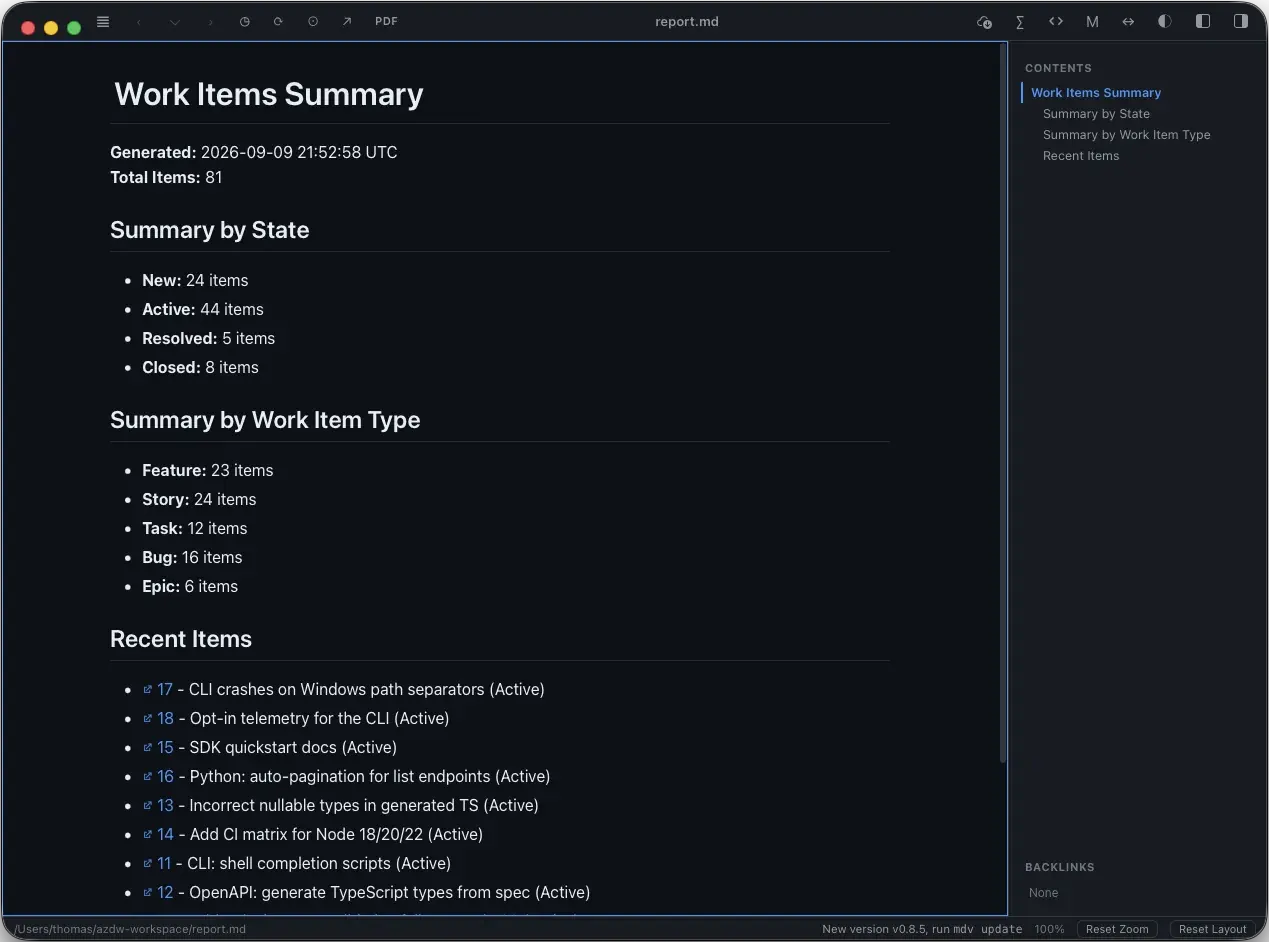
azdw report generate to Markdown or HTML, re-run next month.
A report generated from one command, ready to send.
Optional AI exploration.
Explore prepared work-item context with the built-in chat or your existing agent through MCP. Choose your model and endpoints; review the answers. The collection layer also works without AI.
Reusable automation and integration.
Use the CLI, PowerShell, structured JSON, .NET library, or REST/GraphQL to deliver the same connected foundation through the applications your company needs.
Your existing reporting stays.
Add reusable cross-source collection and relationship resolution behind your reports. Power BI can consume exported CSV data; azdw does not replace your dashboards or their governance.

Equip technical teams to deliver reports, integrations, and agent workflows across your business. Paid plans are based on total organization size, with pricing announced at launch.
Free tier. Free forever. Start with read-only access, 1 connection, and up to 200 work items per query. No time limit. The 30-day evaluation is a separate option for exploring paid capabilities.
Unlimited client orgs · independent consultants and micro-consultancies
Buy via PaddleOrganization-wide license for teams of 51–250 employees
Buy via PaddlePurchasing opens with the public release. Get a launch notification with availability and pricing details.
Build on shared capability instead of repeating the groundwork. Reuse collection, reporting, and integration workflows so your team can focus on business-specific needs. Core collection uses no AI tokens, and your subscription year includes product updates and new features as they become available.
AI usage costs vary by provider, model, and client environment. Use the 30-day evaluation to measure actual model, setup, and infrastructure costs on your own workflows before comparing options.
“Organization size” is the total number of people employed or contracted by the licensing entity, regardless of how many use the software. The applicable license tier and pricing will be announced when azdw is available.
One e-mail when the public release is out — where to get it and what it costs. No newsletter, no sharing, and your address is deleted right after that e-mail.
Choose one recurring portfolio or release review whose preparation requires manual cross-source work. Agree on its sources, risk criteria, and required output, then compare preparation time, manual steps, and source coverage. Include setup, validation, maintenance, and operating costs. Better visibility supports judgment; it does not guarantee a safer release or complete traceability.
Both. The Free tier is free forever, with read-only access, 1 connection, and up to 200 work items per query. It has no time limit. The separate 30-day evaluation lets you explore paid capabilities before choosing a paid plan.
Yes, when you need repeatable reports, relationship analysis, scheduled automation, or data for an internal application or AI agent. Start with one workflow and add more sources later. If native queries already cover your needs, you may not need another tool; the evaluation is a chance to check the fit.
Keep the workflows that work for you. Add azdw alongside your existing tools when you need reusable cross-source queries, resolved work-item relationships, or prepared context for an agent. Start with one question spanning your connected sources and compare the workflow.
Keep your in-editor workflow. azdw can provide a complementary data layer for portfolio reporting, relationship analysis, and custom applications. Use it directly or expose it through MCP to your agent client.
azdw's core queries, relationship analysis, and reports work without AI. If local AI is permitted, configure only local model and agent endpoints to keep AI processing in your environment. Writes go through a two-phase preflight → confirm approval, and collection commands can be saved for repeatable reporting.
You choose and configure the AI provider, model, data, permissions, prompts, and instruction or skill files. Their terms apply, and their output can be inaccurate, incomplete or biased. You must review the output and every proposed change before relying on or approving it. azdw is not intended to make employment or other legally significant decisions about people. See the AI terms and permitted-use conditions.
Yes, as a work-item integration layer for your agents, not as factory orchestration. The azdw Agentic AI Plugin packages access to connected planning context across authorized Azure DevOps and GitHub sources. Your orchestration determines when agents read context or propose work-item updates; writes remain subject to two-phase approval. People can review the resulting plan in the original systems and through azdw reports and relationship views. You remain responsible for configuration, reviewing AI output and proposed changes, and complying with applicable provider terms. See from skills, to loops, to factories and the AI terms and permitted-use conditions.
Keep your dashboards. azdw can collect work items across connected sources, resolve their relationships, and export CSV for your reporting pipeline. Evaluate it where it could replace custom collection scripts or manual preparation, without rebuilding reports that already work.
Yes — github.com and GitHub Enterprise Server. Issues are first-class work items with the same query, relationship, CRUD, visualization, and reporting commands. Labels, types, and states are projected into the unified model; Azure DevOps-only capabilities degrade gracefully.
Core collection follows explicit queries and relationship rules without using AI tokens. Optional models and agents receive prepared data rather than having to discover everything through low-level calls. Their usage can still incur costs, and generated answers can vary. Rerunning a query also reflects changes in source data, permissions, and availability.
Yes. The SaaS scenario illustrates cross-team traceability, not a requirement for using azdw. Product teams, consultancies, and platform teams can start with recurring status reports, dependency reviews, or an internal integration in any industry.
You can. azdw gives you reusable connection handling, query capabilities, relationship resolution, and reporting, so your engineering effort can go into the workflows that make your business different. Compare the parts you would otherwise build and maintain with what azdw already provides.
Because the name is a ladder, and we just added a rung:
Four letters, and the last one is a “double-u” — three syllables for a single letter, which is a lot to ask of anyone before coffee. So we say A-Z-D-U: the “D-U” does the job of D and W together. Not important. But now you know.
Mnemonic for the rock fans: think AC/DC, say AZ/DU. Same energy, fewer amps, no work item left behind. 🤘
Bring one recurring portfolio or release review. Compare the same preparation workflow during your 30-day evaluation and build the business case from your own results.